A popular electronics blog for and by University of Michigan students
Who We Are
Inspired by the University of Michigan's "GO BLUE!" slogan, Blue Tech is an interactive blog run by undergraduate students at the University of Michigan (U of M). We are a diverse group united by our love for U of M and our passion for electronics.
Our Mission
Blue Tech's aim is simple - to provide U of M students with a reliable source of information on the most popular electronic gadgets on the market so that they can make educated purchasing decisions.
Core Values
We pride ourselves on the following core values, which we believe set us apart from other online tech blogs:
1) Our reviews are catered specifically to U of M students, with their lifestyles, needs, and common interests in mind.
2) We only review products that we ourselves own or have owned. We believe this adds credibility and reliability to each of our reviews, as each blogger has had an intimate relationship with any product he or she reviews. Many electronic sites feature product reviews by individuals who review hundreds of different products a month, but own none of them. We feel that what is lost in these sites is the user experience and intimacy that our reviewers have with the products we review. We emphasize quality over quantity, recognizing that a given product cannot be evaluated fairly after a few minutes of "testing" or "experimentation." Instead, a fair evaluation requires an ownership experience on the reviewer's part. The bottom line is that we know the products we review very well, and our reviews reflect this knowledge and intimacy.
How Our Blog Works
Each week, we decide on a theme for the week. In our inception week, it was "Cell Phones." In our second week, it was "MP3 Madness." In this manner, we seek to preserve a level of uniformity and organization in our blog that we feel is essential for a popular electronics blog, where there are thousands of potential product categories.
In the end, we hope our reviews will help you make educated purchasing decisions. We encourage you to comment liberally on our reviews so we improve in our ability to educate our readers.
Thank you for visiting Blue Tech. We value your readership and feedback.
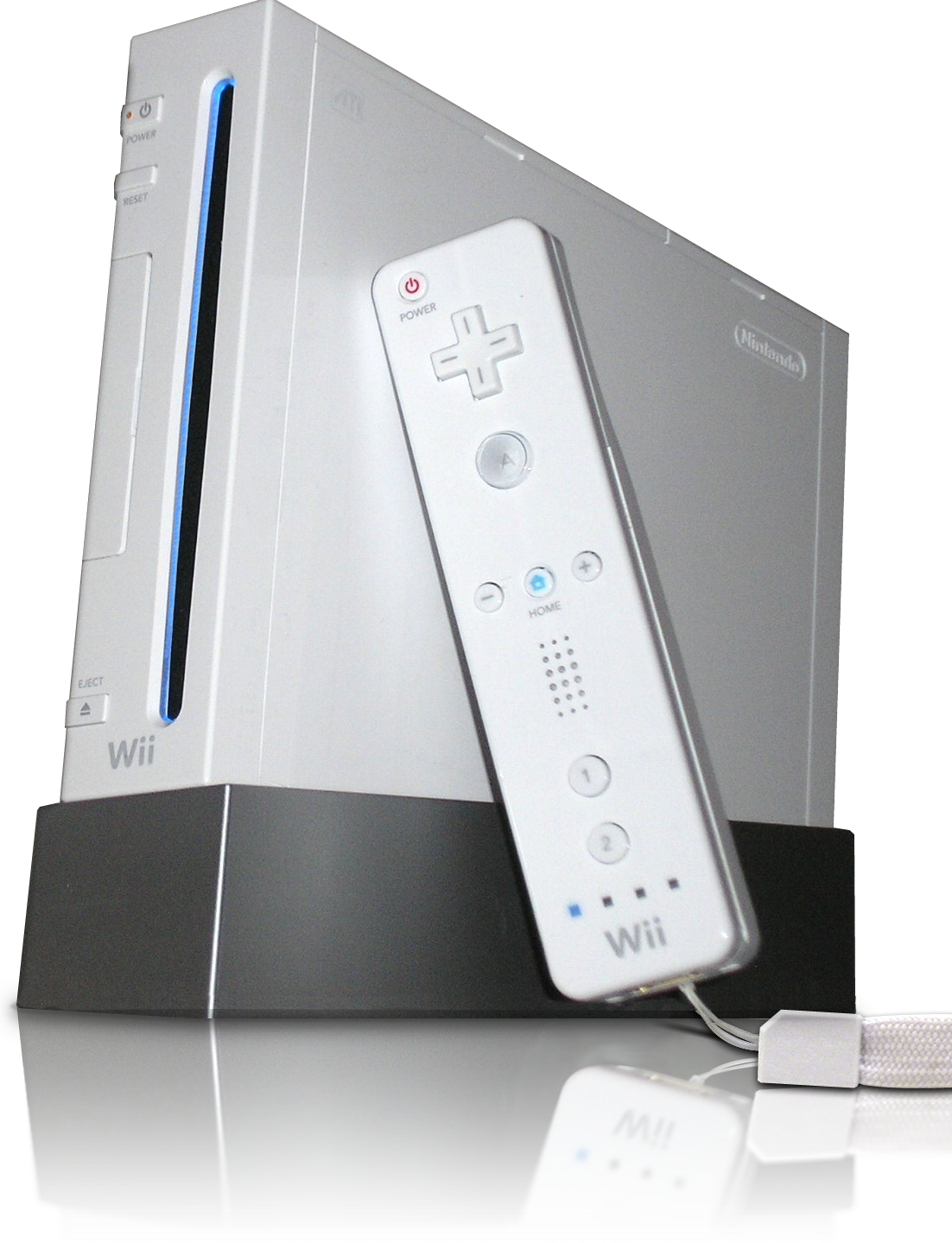
Okay. Lame title and it probably made you facepalm, I'm sure. But look at it this way: the boys have covered the PS3 and the XBox 360. I'm left with the fun little box of white plastic and wiring and god-only knows what else to make that little baby work.
The Nintendo Wii is white. Yes, it's a very small console and it's white. It's actually really cute, in my female opinion. Also, if we want to talk about form and function, it works out well. The power button and eject buttons are literally on the front of the console. And unless you're playing Wii Tennis in front of the console, there would be no reason for you to accidentally shut it off. Should you have a little sibling that likes to yank on power cords....I'm afraid there is nothing I can do to help you.
While the boys go into what goes into the plastic shell of our lovely gaming bits, I'm afraid that I can't. Simply because I don't actually understand it. At all. I have my Wii for one reason and one reason only. I play my games. And to be completely frank, it does its job well. The motion detecting strip was a great idea. Though, admittedly, the muscle burn after playing too much Wii Tennis, is NOT. (Laugh all you want. But, I burned some semi-serious calories playing.)
There are two controllers to the Wii. You've got the controller you actually NEED, then the nunchuck add on. If you're boxing, you want/need the nunchuck. There are a few (well, more than a few) games that require the nunchuck for added function and mobility. However, I rarely play those games at all.
The Wii controller works and well, but I miss the good old days of clunky controllers that actually fit in your hand. The Wii remote is fairly slim and small. It's about half the size of the DS lite. And for whatever reason, when you use it like a normal horizontal controller, feels awkward.
I'm ignoring a good part of the Wii though. It's backwards compatible with the Game Cube. Yes, the discs are half the size. They still fit; they don't get lost; they still play just as amusingly as they did before.
Do I think that the Wii is a good substitute for the XBox 360 or PS3?
...No.
Then again, in all fairness, I own neither the PS3 or XBox 360, so I cannot compare the three consoles properly. Have I played on all three at some point....My epic failure at Halo 3 says "yes." Long story short, all three consoles are brilliant, for completely different reasons.
The Wii is for fun time and random party games that make no sense at all except to giggle and have a fun time. If you want something more serious, something for a far better range of "serious" games, I'd shell out money for either of the other two systems. Don't get me wrong, I love my Wii, but there is only so many times I can play Super Mario Galaxy before I have a craving for some Final Fantasy OR, better yet, the comedic relief my Halo-playing provides.
Courtney out. And....probably to go get her Wii time. Sigh.
Now that we’ve reviewed a fair bit of “serious” technology, lets move onto something a bit more fun. My generation was raised on television and video games; ask almost anyone and you’ll find that they used to play a Nintendo or Gameboy. Today, there are far more choices and the “next-gen” console wars are in full swing. I’ll admit outright that I’m a Xbox 360 owner and lover, but now that I’ve spent some time with a Playstation 3 I’d like to offer some perspective on both its strengths and weaknesses. Look at how pretty it is...
For the uninitiated, there are three next gen consoles, they are: Xbox 360 (360), Playstation 3 (PS3), and the Nintendo Wii (Wii). Only the 360 and PS3 offer gamers a true multiplayer experience and both have larger market shares than do the Wii. So, lets get started on what makes the PS3 a true contender.
The latest rendition of the Playstation boasts the most impressive hardware capability. With a triple core processor running at 3.2GHz, built in blue ray player, and GDDR3 RAM, today’s youth have the equivalent of a supercomputer running their everyday entertainment. The PS3 also sports built in Bluetooth, HDMI, wireless, and integrated media center. Spec wise, there is no contest between what this bad boy has to offer and the other contender, the 360.
Aesthetically, both are big hunks of plastic. The 360 is white (or black if you shelled out some heavy cash for the “elite” version) and the PS3 is black. The Playstation that I tested is the newest slimed version. It features a reduced footprint, more rounded edges, and removes the distinct chrome accents. The power and eject button are both easily accessed and yet unlikely to be hit my mistake – a definite plus if you ask me.
Moving deeper, I found the interface to be rather intuitive, however the nested categories caused me some consternation if I was searching for a very specific command. The guide responded smoothly and efficiently, with little to no hang. This was especially true when I networked the PS3 with my laptop wirelessly. It loaded my music and media flawlessly. Unfortunately, the Playstation indicated that some of my files were unreadable. They ran perfectly well on my computer, so I’m not sure what the PS3’s problem was. I guess it was simply the ghost in the system. Arguably, the most important feature of a console is its game library. Unfortunately for the PS3, the 360 hit the scene early and cornered a lot of titles. There are several PS3 exclusives, Killzone and Resistance both come to mind, that offer features and characteristics comparable to the genre leaders. In many ways, PS3 was limited by the fact that it was the last of the next gen consoles. For my part, I wasn’t able to find many games worth paying for – which is why I don’t own the Playstation.
The Playstation is a solid gaming console. Hands down it has the best features of the bunch, but just because it has all the bells and whistles doesn’t make it the best choices. A limited selection of games keeps the system from realizing its true potential while a hefty price tag discourages the average gamer. Recently, Sony had rectified this to some extent by lowering the cost of the system, but it is still the most expensive. Build quality and interface are both above average and well above expectation. Probably the biggest reason to purchase a Playstation is for the blue ray player, which alone allow the system to compete not only with consoles but also HD DVD players.
While the Xbox 360 is no longer a brand new gaming console, it is still one of the best out there, competing with the Sony Playstation, and the Nintendo Wii.
The Xbox 360 comes in two flavors, Standard and Elite. To be clear, this is a review of the standard Xbox 360. The Elite comes with a much larger (160 GB) hard drive, is black in appearance, and has an HDMI cable for improved picture quality. The standard Xbox 360 is white, and is roughly the size of a large textbook. It is semi-stylish looking due to its subtle curves, but doesn't look overly modern or out of place.
The internals, however, are very impressive for any computer. It boasts three 3.2 GHz processors, 512 MB of 700 MHz GDDR3 Ram, and a detachable 20 GB hard drive (which, as mentioned earlier, can be upgraded or exchanged). The 360 is a lean, mean, game-playing machine that will be pushing the limits of game designers for some time. Microsoft wanted their console to have the components necessary to be able to run the latest, most demanding games for some time -- so long in fact that the company was willing to take a 125 dollar loss on each console sold.
If Microsoft expects the console to remain relevant for long, great games need to be released constantly so that users do not lose interest. Thankfully for 360 users, this has remained true. The Halo series, which helped the original xbox, is still selling very well on the Xbox 360. Other games, such as Fallout 3, Brutal Legends, and Madden 10 (all released on other platforms as well) have helped keep the Xbox 360 community alive and well.
While the games are great, the feature that sets the 360 apart from its competitors is Xbox Live, a system of playing online games against people across the world. Live runs across games, so regardless of which game a user happens to be playing, it is still possible to communicate with another user who is playing a completely separate game. Live also features a friends system, voice communication, customizable avatars, and downloadable content (such as game demos, music videos, game trailers, etc). Furthermore, Microsoft has teamed up with Netflix so that Xbox Live users can stream movies over their 360 at any time with a Netflix account. Gameplay on Xbox Live is easy to understand, and typically runs without lag.
But the Xbox 360 doesn't stop there. It can play DVDs, and stream music, movies, or pictures from computers on the same network. This means that the Xbox 360 is a complete home entertainment system. It can play music, show movies, communicate with friends, and play video games.
Controlling all of this is the Xbox 360 controller, which is comfortable to hold and easy to use. The batteries tend to ware out quickly with these controllers though, so always keep a couple AA batteries around.
The Xbox 360 is a solid entertainment system. It is basically like a specialized computer -- so much in fact, that it will behave like a computer from time to time. This means locking up, and potentially overheating. Microsoft had a problem with the 360, known as the Red Ring of Death, which received a lot of attention from the media. I have had the Red Ring of Death on a 360 console, but Microsoft fixed it for free (including shipping AND packaging). While it was a hassle, I was pleased that it didn't cost me anything.
Having used the 360 for a few years, I am very impressed, especially with the leaps and bounds that Microsoft was able to make in making Xbox Live seem so integrated with the console. Look past some of the old technical problems (have been addressed and fixed in new 360s), and you have a very solid console that can do way more than play games.
Thank you to gamingconsolenetwork.com and Brown University for the images.
Steve, my fellow Blue Tech blogger, has made it quite clear that he is an Apple fan with his reviews of both the iPhone and the iPod Touch. I myself am a Microsoft maniac, which is why my computer is a PC, and my MP3 player is the newest Zune HD Platinum by Microsoft.
It is no secret that Microsoft and Apple compete as number one and two in many categories, and MP3 players are no exception. Apple’s iPod Touch and Microsoft’s Zune are constantly battling for the top spot in MP3 sales, a fight that Apple is currently winning. Now that Steve has reviewed the iPod Touch, allow me to introduce the Zune HD Platinum. While Steve will ultimately side with the iPod Touch and I with the Zune, our goal here is not to convince you to side with either of us, but to help you make an informed purchase. With that in mind, I will evaluate Microsoft’s Zune HD next to Apple’s iPod Touch, but I will emphasize the Zune’s features, as Steve has already reviewed the Touch. Let’s cut to the chase.
The Zune HD and iPod Touch clearly set the bar high for MP3 players, but which one’s better?
The answer is, it depends.
Performance
Let’s face it, guys—performance is what we shell out $200 for when buying our new MP3 players. That said, the Zune HD delivers like never before, representing a major improvement over previous versions with its powerful, 512MB N-VIDIA Tegra processor and vibrant 3.3”/16:9 wide-screen OLED display. For all of you non-techies out there, what this means for you is blazing fast response times, wide viewing angles, exceptional color reproduction, outstanding contrast levels, and a large brightness range. OLED technology is the holy grail of TV technology, lending itself to the extremely thin and lightweight design of the Zune. Whether you are watching regular old podcasts or full length movies on Zune Marketplace, video on the Zune HD is an absolute pleasure. Compared to the iPod Touch’s display, the Zune’s screen is .2” smaller, but the Touch’s LCD technology is primitive next to OLED. In short, OLED makes all the difference here with its enhanced resolution. And while the Touch supports more video formats (e.g. wmv, avi, mpg4) than the Zune, with a display like the Zune’s, you’ll learn to deal with this shortcoming.
The Zune HD's battery life is superior to the iPod Touch’s with its 33 hours of audio playback and 8.5 hours of video compared to the Touch’s 30 hours of audio and 7 hours of video (on a single charge). As a previous owner of the iPod Touch and a current owner of the Zune HD, I can confidently tell you that there is minimal difference in sound quality between the two. The only discernable difference is that the maximum volume on the iPod Touch is a few clicks higher than the Zune’s. Both devices feature EQ presets to adjust sonic qualities such as treble, bass, balance, but the Touch has a wider range of adjustable settings. The average listener never even touches these presets, but a more music-savvy listener may derive tremendous satisfaction from finding the perfect combination of EQ settings.
Overall, this was not much of a contest, as there is currently no compact display technology superior to the Zune’s 720p hi-def OLED. The Zune takes this round hands down.
Zune 1, Touch 0
Physical Design
The Zune HD’s anodized aluminum body is sleek and sexy.
To all of you who were turned off by the original Zune’s hideous, brick-like design, you will no longer be disappointed. The Zune HD has a sexy and slender body as thin as the iPod Touch (0.3”), and it is smaller than the iPod Touch (4”X 2” vs. 4.3” X 2.4”). The best part of the Zune’s new look is its anodized aluminum body, which gives the Zune a futuristic, “Star Trekkish” look. Interestingly, the aluminum construction also allows the Zune to be 1.5 ounces lighter than the iPod Touch, whose chrome steel casing is not only heavier, but attracts major scratches and smudging. Users seeking a device with a solid, durable feel will be happy to know that the Zune has a glass covered screen more impervious to damage than the Touch’s soft screen.
Like the Touch, the Zune is a touch-screen device, so the majority of control lies on the screen. The device has a power/hold button on the top left corner, a home button akin to the Touch’s main button (below the screen), and a side button for quick access to on-screen playback and volume controls. This last button is a mystery to me! Why wouldn’t Microsoft make the button a dedicated volume control like Apple did with the Touch? Talk about making it harder for owners. The lack of a dedicated volume control button on the Zune means that it is virtually impossible to adjust the volume without taking the player out of your pocket. This is a MAJOR inconvenience.
This was definitely a close one, but the Zune gets the nod here because of the host of advantages accompanying its aluminum body, including reduced weight and scratching potential.
Zune 2, Touch 0
Media Playback Experience
Since Blue Tech’s focus this week is on the MP3 player, I want to focus on features specifically related to media playback that I feel set the Zune apart from the Touch.
From Left: Home Screen, Pins and History, Now Playing, HD Radio
1. With the iPod Touch, navigating to a certain album, artist, or song requires multiple swipes and taps of the screen. However, on the Zune, you can pin favorites on the home screen, be they specific albums, playlists, podcasts, or videos. This allows a user to avert multiples menus and submenus to reach a specific destination on the device. In a world where speed and convenience are everything, this is an excellent feature. One of the most frustrating things about the iPod Touch is that it requires several taps to get to a specific destination, and once you exit that destination for the home screen, you have to tap away again to return to where you were. With the Zune, you simply pin the desired destination to the home screen, and with a single tap, you’re there. On a related note, on the Zune’s home screen, there is a History tab that displays what you’ve been doing most on the device (analogous to a “Recent Calls” tab on a cell phone), so you can quickly get back to where you go most.
2. These days, most MP3 players allow you to sort music by artist, album, song, genre, and playlist, and the Zune is no exception. However, in the past year, Microsoft has been investing heavily in digital enhancement of the Zune’s listening experience by designing software preloaded with biographical information, discography, artist images, and more. This new software sets the Zune apart from the Touch and other MP3 players by redefining the user experience with a given artist, album, or song. When playing a given song, the Zune displays in the background a hi-definition slideshow of the song’s artist. Taking a step back, even before you choose to play a specific song, when you select an artist, a list of their albums set against a background photo of the artist, along with tabs offering biographical information, additional photos, and a list of related artists appears. What is so special about all of this? ALL OF THESE ELEMENTS ARE PULLED OFFLINE DIRECTLY FROM SOFTWARE PRELOADED ON THE ZUNE. If the Zune HD is connected to the internet, the Zune will allow you to view an artist's entire album collection and download it all instantly via Microsoft's Zune Pass (for a flat rate of $14.99 for unlimited downloads.) In stark contrast to the Zune, the iPod Touch can only display album covers or artist images if the user physically loads them onto the device. To make a long story short, the listening experience is dynamic on the Zune, while it is rather bland on the Touch.
3. Microsoft has always been the industry leader when it comes to offering radio in its MP3 players, and it still is. Microsoft has added HD radio broadcasts to the Zune’s existing FM radio tuner, which deliver premium sound quality and allow Zune HD users to instantly view information on the song currently playing and tag it for download. The Touch does not come with a FM tuner, although you can download third-party online radio applications. However, these applications require an internet connection, which is often unavailable.
These three features put the Zune in a league apart from the Touch and other MP3 players in the realm of media playback. This should come as no surprise, however, given that the iPod Touch’s mass appeal is largely attributable to its third-party applications and web browsing rather than its media playback functionality.
Zune 3, Touch 0
Room for Improvement
Currently, two main features keep Apple’s iPod Touch ahead of the Zune in the market for MP3 players. These are the Touch’s web browser and third-party applications.
While the Zune HD's web browser is similar to the Touch’s Safari browser with its tilt sensor to orient pages in portrait or landscape views and its finger-pinching zoom feature, the Zune’s browser does not support Flash content. This seriously cripples the web browsing experience by denying users access to popular videos sites such as YouTube or Hulu. The Zune’s browser also lacks the auto-fill, copy-and-paste, and multiple window browsing capabilities that made the Touch’s Safari web browser revolutionary.
Zune 3 Touch 1
Then there are the third-party applications on the iPod Touch. Arguably, the tens of thousands of “apps” downloadable directly to the iPod Touch from Apple’s App Store singlehandedly make the device the most highly functional MP3 player on the market. The Zune HD has a few built-in applications, including calculator, weather, and games, but it does not even have social networking apps like Twitter and Facebook, let alone any of the thousands of other apps offered on the Touch. The now common aphorism that goes something like, “The Touch has an app for everything” is not unfounded. The Touch literally does have an app for almost everything, including a radar detector that detects police surveillance devices when driving and a mood monitor that measures key determinants of the user’s mood via visual and audible expressions. These are just a few of the fascinating apps offered on the Touch. Others include Stanza, a book reader that grabs free titles from public domains, and Shazam, an app that identifies song titles when the user holds the Touch up to a speaker playing the unknown tune. How do you beat these applications? Microsoft has to be asking itself the same question. Apple’s third-party apps are all that stand in Microsoft’s way to the top of the MP3 player market. Unfortunately for Microsoft, these apps may be the only feature it cannot replicate.
Zune 3 Touch 2
Putting it all Together
At the end of the day, the Zune HD is a powerful media player more than anything else, redefining the media playback experience with its built-in music information database and high definition OLED display. It is not an iPod Touch, which is less an MP3 player and more like a laptop notebook with its focus on web browsing and applications. Microsoft and Apple clearly have different visions with their MP3 players, and they attract different types of customers.
The final score is Zune-3, Touch-2. Keep in mind, however, that this score emphasizes media playback as the primary benefit of MP3 players and does not reflect an exhaustive list of criteria. I chose to use a scoring system in this review because of feedback I received from readers requesting one. When deciding which one is for you, ask yourself the following question: Will I use my MP3 player primarily for listening to music and watching videos? If your answer is “yes,” get the Zune. If not, the Touch may be the better option for you, as it can do everything else better than the Zune.
Information Before you Buy
I wanted to focus on the user experience in this review, so I deliberately did not list all of the Zune HD’s specs or post a slideshow of images. All of this information, including available colors and memory quantities, are available on the Zune HD's Official Website. For similar information on Apple’s iPod Touch, also check out its official website here. If you’re hard-pressed for time and want to see a simple comparison chart between the Zune HD and the iPod Touch, check out the Zune vs. iPod Comparison Chart, courtesy of ZuneScene.com.
Thanks for reading, everyone. Please leave comments! I love hearing from you guys.
Howdy friends, family, gentlemen, and especially the ladies. I hope you enjoyed last week's review of the Apple iPhone, because it isn’t over yet. Phone Week may be over, but now it's MP3 Madness! Today I’ll be specifically reviewing the MP3 capability of the iPhone, which is presumably comparable to the iPod Touch, the latest and greatest iPod featured by Apple. I’d review the touch, but it seems Apple doesn’t believe my opinion is worth the cost of providing me a free model to review, how unsporting! For those of you that still love Apple, I've thrown up their iPhone as an iPod commercial. It is located after the review for your viewing pleasure.
Just a reminder, I’m pretty lazy and since I’m still technically reviewing the same product as last week... the next two paragraphs are more or less cut and pasted from the previous review; feel free to skip them if you want to get straight to the new stuff.
Construction and Battery
The iPhone is sleek and fits comfortably in the palm of your hand. Unlike most MP3 Players, the new iPhone features two colors. Users have the choice of either a black or white body color (though many protective cases can be purchased in varying colors). Due to my somewhat clumsy nature, I have firsthand experience with the resiliency of the phone. After several weeks of use the outer case is somewhat scuffed, but the screen has yet to suffer any cracks or scratches. I'm thoroughly impressed with how solid the phone has proven to be, 10/10.
The battery on the other hand has been a bit of a disappointment. It seems that with each update Apple accidentally damages the total battery life. Updates are not meant to be detrimental to a product, quite the opposite in fact. That being said, the iPhone can operate as an iPod for something on the order of 16 hours before I start to get worried about the battery (Yes, I left it on and playing music for that long before I decided I needed to use my phone and should charge it). Having not used another MP3 Player recently I’ll stick with my 5/10 from before.
Interface
The second interaction you’ll have with the iPhone is with its touch sensitive interface. Not surprisingly, it performs quite well and as I noted before, it seems that Apple put more effort into the multifunction capability than into the actual phone. The accelerometer changes the interface based upon the orientation of the phone. When in landscape mode, the MP3 displays the cover art for individual CDs that is easily navigable with the flick of a finger. Unfortunately, if you didn’t legally import your CDs into iTunes, you’ll have to download and copy the cover art individually. Way to make things complicated for 95% of the world Apple. When oriented vertically the iPhone exhibits your standard fare interface. It has all the expected sorting options and remains easy to use thanks to the touch screen. Give yourself 10 minutes with the device and you’ll have it figured out without a problem, my vote is 7/10 for usability, cover art issues are annoying and the lack of buttons means you cant adjust settings while wearing gloves or with the player in a pocket.
Sound Quality and iTunes
It has been my experience with the iPhone that the sound quality is effected not just by the level of compression of the MP3, but also by the quality of headphones and even your ear for music. I’ll be the first to admit that I don’t have the best hearing, but I was able to mess around with different speakers and headphones as well as different compression versions of the same song. The stock Apple headphones are pretty cheap, I’d suggest you swap them out quickly. My pair is getting a little old and tends to shock me in one ear so I don’t usually wear them. When paired with a headset designed for competitive video games (built in surround sound and small subwoofers) the iPhone outputs a surprising level of sound. The clarity decreased somewhat significantly as I increased the volume, with distortion highly obvious at about 87% of full volume. For the stock package delivered by the iPhone, I’ll concede a 6/10, the cheap headphones and tendency to distort at high volume is a big turn off.
iTunes is a big question mark for a lot of people. DRM music is only usable on computers linked to your account or pieces of hardware that you own. At any time, Apple could technically kill or remove your property, even though you paid for it. On one hand, the ability to download music, movies, applications, games, and all manner of entertainment on demand is great. On the other, the level of control that Apple leverages over your personal property is almost big brotherish. Unfortunately, you can’t use one without the other so looks like you’re stuck. On the upside, iTunes works significantly better than the Windows equivalent. 8/10 for the software, docked 2 points for the invasion or property.
What it all Means
The iPhone is a solid MP3 Player. It does everything in an efficient and pretty manner, though outside of the touch screen it fails to innovate in any standout way. Applications have been available for years and while access to the iTunes App store means access to limitless potential, it is also the potential to spend a lot of money on things you’ll just lose anyway. My score leaves the phone sitting not so pretty at a 74, just above average. If you plan to use a MP3 player for everything under the sun and never intend to be away from it, then the iPhone/iPod Touch is for you. But, if you want a dedicated player I’d suggest looking elsewhere.
Many consumers do not know that there are other mp3 players in existence besides Apple's iPod (Read Steve's Review of the iPod). In fact, there are many different companies which make these portable music players -- some of which create a superior product for the same or less price.
One of these superior products comes from the Japanese company, Toshiba. The Gigabeat T-Series doesn't look like anything too special. It is black, and comes with a choice of four colors for the control pad and back of the mp3 player. It features a 2.4 inch, full color screen. The Gigabeat is small -- it's only about 3.5" x 2", or about the size of a credit card. What is better is that it's not much thicker than one either, at around half of an inch. The buttons are big enough to press, and are easy to feel while the device is in a pocket. And yes, it uses buttons. There is not a touch screen on this device, and although it might not seem as "cool" or technologically up-to-date, these buttons have their advantages, such as being able to operate the mp3 player with gloves on (crucial in an environment which often requires it), or completely by touch when its not in sight (such as when in a pocket).
Upon turning it on, the Gigabeat displays its menu, which is easy to navigate, selecting through music, pictures, videos, recorded TV shows, and settings. Songs can be organized by title, artist, genre, or playlist. Specific songs are easy to find due to the first letter of the song appearing as you scroll, so that one can stop at the letter the target song begins with. Movie quality is good, as the screen has a resolution of 240x320 pixels, which is good considering its small size. However, the Gigabeat has only 4 GB of storage space, which means that you may have to pick and choose the movies or music that you put on to it.
Unlike Apple's iPod which must use iTunes to sync to a computer, the Gigabeat can use a number of free programs. Windows Media Player is the recommended program to sync the Gigabeat to your PC, but WMP is a frustrating program in general, and thus syncing the Gigabeat can be difficult. However, other programs, such as WinAmp, a free media player from Nullsoft Inc, can manage the files on the Gigabeat with no problems. Furthermore, one can always manually drag files from their computer drive into the Gigabeat directly if neither of these programs are available. Still, with limited space, managing the songs on the Gigabeat can get a bit tedious through any program.
The feature that sets this mp3 player above the rest is its sound quality. Toshiba did not skimp in the electronics, and thus the Gigabeat is able to deliver a full, rich, and accurate sound. In fact, there is a setting called Harmonics, in which the user can select from either none, professional, or dynamic. With either professional or dynamic enabled, the mp3 player is able to bring better sound quality from an mp3 song, which is a format often known for its terrible, terrible quality. Mp3s are highly compressed, which means that lots of the information that was present in the original recording has been omitted so that the file size is smaller. However, the harmonics of the Gigabeat compensates for frequencies that were neglected during compression. It's not a large change at all -- in fact, most users may not notice a difference, but the change is there, and it helps squeeze a bit more sound quality out which otherwise would have been lost. The Gigabeat designers seem to have had sound quality as one of their top priorities, because they did not allow the device to become loud enough to distort. An iPod, for example, will distort above 90% of its volume. Even though this will cause it to become "louder," the last 10% sacrifices sound quality -- something which the iPod isn't really known for anyway. Anyway, the Gigabeat doesn't do this, but it also will not become as loud. While normally not a problem (especially with today's overly compressed music), there are times in which I would have liked a little bit more volume.
Battery life is excellent. Toshiba claims 16 hours of music play time, although I found it to be more around 12-13 hours, depending on listening volume, screen brightness, etc.
The Gigabeat might not be for everyone. Sound quality seems to be of little concern to many people of my generation, and thus probably isn't high on priority lists when considering a new mp3 player. Its incompatibility with Macs and iTunes DRM music will make it a hassle for many to use. However, if you want a solid, reliable product with decent sound quality, then look no further than the Gigabeat. It's relatively cheap at about 100 dollars, and is a great alternative to the iPod. Unfortunately, the Gigabeat is no longer in production, but the specs and features can be seen at the Toshiba Gigabeat Website.
If ever you wanted a basic phone that did its job, you're not going to be looking at the LG dare. The LG Dare’s release was announce on June 11, 2008. Since then, I asked my father near everyday if I could “please, please, pretty please” have the phone.
Finally. Success.
The Dare measures 4.1 inches down, 2.2 inches across, and is half an inch wide. It weighs in at 3.75 oz and features a 3 inch touch display.
Touch Screen:
It takes a bit of time to get used to using. For one, I found that using the tips of my nails to hit the screen made it far easier to use. My friends without, made do with either jabbing at the screen repeatedly until it did what they wanted it to, or resorted to using a stylus to navigate my phone. It is also equipped with handwriting recognition. For a touch phone, that makes sense. I’ve used it once or twice when trying to send a text. Honestly, you’re better off ignoring the function altogether. It’s frustrating because half the letters you write end up as something entirely different.
Camera:
The camera in the phone is a 3.2 megapixel camera which actually shoots decent photographs. It has both flash and a zoom function. The flash is great. I just wish that there was a way to convert and use that thing as a flashlight. My complaints with the camera lie solely with the zoom. If you have the image size set to the highest it can go, you can’t use the zoom function. You can only use the digital zoom when you drop down the image size. To be honest, it’s utterly pointless. I’ve printed several pictures taken with my phone, and while not OMG DSLR quality, they’re not half bad. For me, the camera is dependable as a back-up, especially since I seem to have lost my camera’s battery charger.
Multimedia:
The LG Dare functions both as a video and music player. It supports MP3, AAC, AAC+, and WMA file formats and the sound quality is good. It’s clear and loud enough to be heard by the people in your vicinity. Admittedly, if you’re in the library, please use the 3mm headphone jack that’s located on the upper left hand corner of your phone.
As far as applications go, you can download near anything on the LG Dare. It installs right away and you can use it at will. One of my favorite Verizon applications is the Backup Assistant. It automatically backs up all of your contacts, so should you ever need to change phones, you need only download the application to the new phone, input your PIN, and watch as your contacts are stored in the new phone. Verizon also waives the monthly charge for that application if you are a MyVerizon user. It’s an amazing alternative to people inviting you to their new “I lost my phone and need your numbers” Facebook group.
Themes:
The LG Dare has two basic decorative themes to the phone. White or black. The black theme is more rigidly structured, where all of the tabs and icons in the menu are set up appropriately in rows and columns. The white theme leaves your icons strewn about in an organized chaos. There are several fonts available to change and personalize the appearance of your phone. There are the typical “serious” fonts and two “fun” (rather, more fun) fonts to use: Joy and Script. Script looks like Bradley Hand ITC and Joy...just looks...spunky.
Battery life:
No one’s battery is as good as it was when you first bought the phone. The Dare’s battery is equipped to be able to hold 4.5 hours of talk time and almost 360 hours of standby time (15 days). My battery now, even as abused as it has been since February, still lasts me through the day. Unless you’re trying to have marathon talk times on this phone, a standard battery should last you a full day. Otherwise, consider getting yourself an extended battery or a spare normal battery that you can keep charged and on hand. It’s actually a good idea if you don’t have a car charger and you frequently go on longer trips.
3G capable:
The LG Dare can process email, can browse through the internet, has a calendar that you can store all of your “most important dates”, alarms, notepad, etc. This phone is NOT equipped to take the place of a smart phone, but it can be used in place of one if you aren’t ready to take that step yet.
Call Quality:
This phone takes great calls and has a decent sound quality. My only complaint seems to stem more from Verizon and its service rather than anything the phone does. There’s a strange thing some Verizon phones will do at some point whilst you have them. You can hear your voice echoing back. Some people find it to be a minor nuisance that is easily ignored. I hate hearing my voice played back to me. It makes me want to, happily, chuck my phone out of the nearest window. There is another flaw as well. Some Verizon calls are picked up or sent with a horrid amount of static. Just hang up and redial. Fixes the problem right away.
Bluetooth capable:
Yes. It is. Good news: hands free driving. Bad news: you will need to invest in a quality headset. The cheaper ones have far too much background noise and are NOT worth getting.
Cons:
The LG Dare has a strange system glitch that will make your phone power off and power back on while using certain applications. Or, the entire phone will freeze outright. Verizon’s said there was a system update that fixed that. Bollocks. It made mine worse. I just finally hauled into a store and asked them to replace my phone with another. No problems thus far. So, maybe I just got a glitchy phone.
Overall:
The LG Dare is a great phone for everyday use and for someone who definitely doesn’t want to hit the smart phone market yet. It’s versatile and light. It’s capable of handling a fair few of the smart phone applications without being as technically and usage broad as a smart phone can be. If not for that, it’s cute.
Name: Nabeel Hometown: Washington, D.C. School: Stephen M. Ross School of Business at the University of Michigan
About: Nabeel was born with a cell phone in his right hand and a remote control in his left. He has proudly been a tech freak since a young age, and he lives and breathes electronics. On any given day, you can find him reading tech magazines in class and watching electronics videos on his $300 BlackBerry Tour Limited Release smart phone. He seems to have a new gadget every week, whether it's a new MP3 player or a high-tech watch. His goal as a Blue Tech Blogger is to share his thoughts on products he owns so readers can make informed purchasing decisions.
Name: Sean Hometown: Ann Arbor, MI School: University of Michigan, LS&A
About: Sean became interested in electronics at an early age through tinkering with the family computer. Now he reviews electronics with the average college student in mind, and thus tries to provide reviews on useful items that don't cost an arm and leg.
Name: Steve Hometown: Galesburg, MI School: University of Michigan, LS&A
About: Steve has always been a bit of a nerd. Founding member of Computer Club in high school and a devoted hands on techie, he has worked the last 3 years for the University as a computer hardware specialist. Given his both his interest and talent in all things tech, writing for the blog is less a duty and more a break from work!
Name: Courtney Hometown: Saginaw, MI School: University of Michigan, LS&A
About: Courtney has always loved computers and subsequently breaking them. She was an avid gamer all throughout her younger schooling years and has had a lot of experience breaking and, occasionally, fixing some bit of technology in her life. She practically lives with the Geek Squad in her home town. She figured it would be a good idea to help people as technologically challenged as she was.
Name: Megan Hometown: Farmington Hills, MI School: University of Michigan, LS&A
About: Having an older brother, Megan was forced into the electronics world. She was constantly aware of new technology advances whether it was video games or Amazon Kindles. Although electronics are a part of her life, she is not knowledgable about the technical details of these prodcuts. Megan is reviewing electronics for the average college student who wants to learn about the general qualities of products.