A popular electronics blog for and by University of Michigan students
Who We Are
Inspired by the University of Michigan's "GO BLUE!" slogan, Blue Tech is an interactive blog run by undergraduate students at the University of Michigan (U of M). We are a diverse group united by our love for U of M and our passion for electronics.
Our Mission
Blue Tech's aim is simple - to provide U of M students with a reliable source of information on the most popular electronic gadgets on the market so that they can make educated purchasing decisions.
Core Values
We pride ourselves on the following core values, which we believe set us apart from other online tech blogs:
1) Our reviews are catered specifically to U of M students, with their lifestyles, needs, and common interests in mind.
2) We only review products that we ourselves own or have owned. We believe this adds credibility and reliability to each of our reviews, as each blogger has had an intimate relationship with any product he or she reviews. Many electronic sites feature product reviews by individuals who review hundreds of different products a month, but own none of them. We feel that what is lost in these sites is the user experience and intimacy that our reviewers have with the products we review. We emphasize quality over quantity, recognizing that a given product cannot be evaluated fairly after a few minutes of "testing" or "experimentation." Instead, a fair evaluation requires an ownership experience on the reviewer's part. The bottom line is that we know the products we review very well, and our reviews reflect this knowledge and intimacy.
How Our Blog Works
Each week, we decide on a theme for the week. In our inception week, it was "Cell Phones." In our second week, it was "MP3 Madness." In this manner, we seek to preserve a level of uniformity and organization in our blog that we feel is essential for a popular electronics blog, where there are thousands of potential product categories.
In the end, we hope our reviews will help you make educated purchasing decisions. We encourage you to comment liberally on our reviews so we improve in our ability to educate our readers.
Thank you for visiting Blue Tech. We value your readership and feedback.
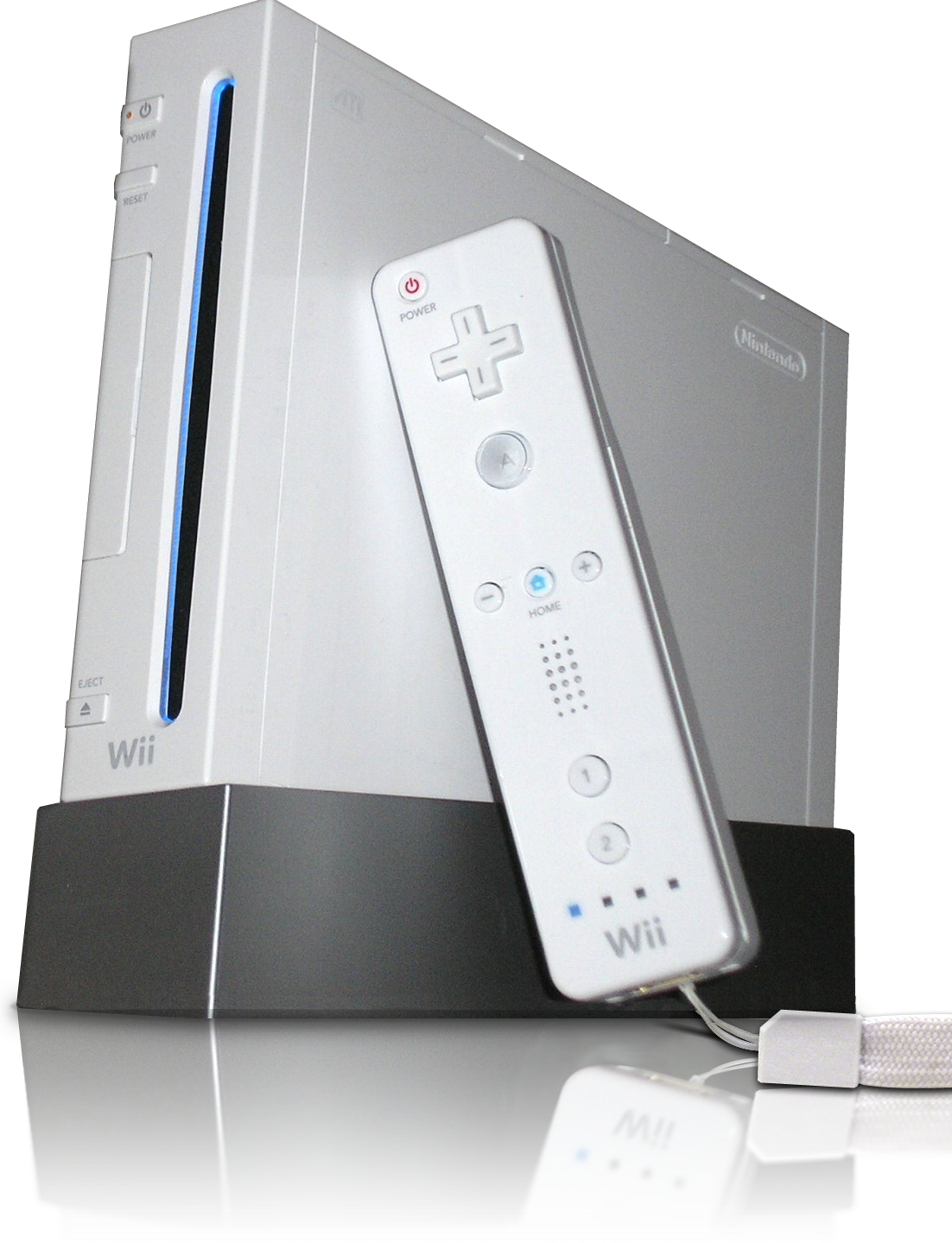
Okay. Lame title and it probably made you facepalm, I'm sure. But look at it this way: the boys have covered the PS3 and the XBox 360. I'm left with the fun little box of white plastic and wiring and god-only knows what else to make that little baby work.
The Nintendo Wii is white. Yes, it's a very small console and it's white. It's actually really cute, in my female opinion. Also, if we want to talk about form and function, it works out well. The power button and eject buttons are literally on the front of the console. And unless you're playing Wii Tennis in front of the console, there would be no reason for you to accidentally shut it off. Should you have a little sibling that likes to yank on power cords....I'm afraid there is nothing I can do to help you.
While the boys go into what goes into the plastic shell of our lovely gaming bits, I'm afraid that I can't. Simply because I don't actually understand it. At all. I have my Wii for one reason and one reason only. I play my games. And to be completely frank, it does its job well. The motion detecting strip was a great idea. Though, admittedly, the muscle burn after playing too much Wii Tennis, is NOT. (Laugh all you want. But, I burned some semi-serious calories playing.)
There are two controllers to the Wii. You've got the controller you actually NEED, then the nunchuck add on. If you're boxing, you want/need the nunchuck. There are a few (well, more than a few) games that require the nunchuck for added function and mobility. However, I rarely play those games at all.
The Wii controller works and well, but I miss the good old days of clunky controllers that actually fit in your hand. The Wii remote is fairly slim and small. It's about half the size of the DS lite. And for whatever reason, when you use it like a normal horizontal controller, feels awkward.
I'm ignoring a good part of the Wii though. It's backwards compatible with the Game Cube. Yes, the discs are half the size. They still fit; they don't get lost; they still play just as amusingly as they did before.
Do I think that the Wii is a good substitute for the XBox 360 or PS3?
...No.
Then again, in all fairness, I own neither the PS3 or XBox 360, so I cannot compare the three consoles properly. Have I played on all three at some point....My epic failure at Halo 3 says "yes." Long story short, all three consoles are brilliant, for completely different reasons.
The Wii is for fun time and random party games that make no sense at all except to giggle and have a fun time. If you want something more serious, something for a far better range of "serious" games, I'd shell out money for either of the other two systems. Don't get me wrong, I love my Wii, but there is only so many times I can play Super Mario Galaxy before I have a craving for some Final Fantasy OR, better yet, the comedic relief my Halo-playing provides.
Courtney out. And....probably to go get her Wii time. Sigh.
Now that we’ve reviewed a fair bit of “serious” technology, lets move onto something a bit more fun. My generation was raised on television and video games; ask almost anyone and you’ll find that they used to play a Nintendo or Gameboy. Today, there are far more choices and the “next-gen” console wars are in full swing. I’ll admit outright that I’m a Xbox 360 owner and lover, but now that I’ve spent some time with a Playstation 3 I’d like to offer some perspective on both its strengths and weaknesses. Look at how pretty it is...
For the uninitiated, there are three next gen consoles, they are: Xbox 360 (360), Playstation 3 (PS3), and the Nintendo Wii (Wii). Only the 360 and PS3 offer gamers a true multiplayer experience and both have larger market shares than do the Wii. So, lets get started on what makes the PS3 a true contender.
The latest rendition of the Playstation boasts the most impressive hardware capability. With a triple core processor running at 3.2GHz, built in blue ray player, and GDDR3 RAM, today’s youth have the equivalent of a supercomputer running their everyday entertainment. The PS3 also sports built in Bluetooth, HDMI, wireless, and integrated media center. Spec wise, there is no contest between what this bad boy has to offer and the other contender, the 360.
Aesthetically, both are big hunks of plastic. The 360 is white (or black if you shelled out some heavy cash for the “elite” version) and the PS3 is black. The Playstation that I tested is the newest slimed version. It features a reduced footprint, more rounded edges, and removes the distinct chrome accents. The power and eject button are both easily accessed and yet unlikely to be hit my mistake – a definite plus if you ask me.
Moving deeper, I found the interface to be rather intuitive, however the nested categories caused me some consternation if I was searching for a very specific command. The guide responded smoothly and efficiently, with little to no hang. This was especially true when I networked the PS3 with my laptop wirelessly. It loaded my music and media flawlessly. Unfortunately, the Playstation indicated that some of my files were unreadable. They ran perfectly well on my computer, so I’m not sure what the PS3’s problem was. I guess it was simply the ghost in the system. Arguably, the most important feature of a console is its game library. Unfortunately for the PS3, the 360 hit the scene early and cornered a lot of titles. There are several PS3 exclusives, Killzone and Resistance both come to mind, that offer features and characteristics comparable to the genre leaders. In many ways, PS3 was limited by the fact that it was the last of the next gen consoles. For my part, I wasn’t able to find many games worth paying for – which is why I don’t own the Playstation.
The Playstation is a solid gaming console. Hands down it has the best features of the bunch, but just because it has all the bells and whistles doesn’t make it the best choices. A limited selection of games keeps the system from realizing its true potential while a hefty price tag discourages the average gamer. Recently, Sony had rectified this to some extent by lowering the cost of the system, but it is still the most expensive. Build quality and interface are both above average and well above expectation. Probably the biggest reason to purchase a Playstation is for the blue ray player, which alone allow the system to compete not only with consoles but also HD DVD players.
While the Xbox 360 is no longer a brand new gaming console, it is still one of the best out there, competing with the Sony Playstation, and the Nintendo Wii.
The Xbox 360 comes in two flavors, Standard and Elite. To be clear, this is a review of the standard Xbox 360. The Elite comes with a much larger (160 GB) hard drive, is black in appearance, and has an HDMI cable for improved picture quality. The standard Xbox 360 is white, and is roughly the size of a large textbook. It is semi-stylish looking due to its subtle curves, but doesn't look overly modern or out of place.
The internals, however, are very impressive for any computer. It boasts three 3.2 GHz processors, 512 MB of 700 MHz GDDR3 Ram, and a detachable 20 GB hard drive (which, as mentioned earlier, can be upgraded or exchanged). The 360 is a lean, mean, game-playing machine that will be pushing the limits of game designers for some time. Microsoft wanted their console to have the components necessary to be able to run the latest, most demanding games for some time -- so long in fact that the company was willing to take a 125 dollar loss on each console sold.
If Microsoft expects the console to remain relevant for long, great games need to be released constantly so that users do not lose interest. Thankfully for 360 users, this has remained true. The Halo series, which helped the original xbox, is still selling very well on the Xbox 360. Other games, such as Fallout 3, Brutal Legends, and Madden 10 (all released on other platforms as well) have helped keep the Xbox 360 community alive and well.
While the games are great, the feature that sets the 360 apart from its competitors is Xbox Live, a system of playing online games against people across the world. Live runs across games, so regardless of which game a user happens to be playing, it is still possible to communicate with another user who is playing a completely separate game. Live also features a friends system, voice communication, customizable avatars, and downloadable content (such as game demos, music videos, game trailers, etc). Furthermore, Microsoft has teamed up with Netflix so that Xbox Live users can stream movies over their 360 at any time with a Netflix account. Gameplay on Xbox Live is easy to understand, and typically runs without lag.
But the Xbox 360 doesn't stop there. It can play DVDs, and stream music, movies, or pictures from computers on the same network. This means that the Xbox 360 is a complete home entertainment system. It can play music, show movies, communicate with friends, and play video games.
Controlling all of this is the Xbox 360 controller, which is comfortable to hold and easy to use. The batteries tend to ware out quickly with these controllers though, so always keep a couple AA batteries around.
The Xbox 360 is a solid entertainment system. It is basically like a specialized computer -- so much in fact, that it will behave like a computer from time to time. This means locking up, and potentially overheating. Microsoft had a problem with the 360, known as the Red Ring of Death, which received a lot of attention from the media. I have had the Red Ring of Death on a 360 console, but Microsoft fixed it for free (including shipping AND packaging). While it was a hassle, I was pleased that it didn't cost me anything.
Having used the 360 for a few years, I am very impressed, especially with the leaps and bounds that Microsoft was able to make in making Xbox Live seem so integrated with the console. Look past some of the old technical problems (have been addressed and fixed in new 360s), and you have a very solid console that can do way more than play games.
Thank you to gamingconsolenetwork.com and Brown University for the images.
Steve, my fellow Blue Tech blogger, has made it quite clear that he is an Apple fan with his reviews of both the iPhone and the iPod Touch. I myself am a Microsoft maniac, which is why my computer is a PC, and my MP3 player is the newest Zune HD Platinum by Microsoft.
It is no secret that Microsoft and Apple compete as number one and two in many categories, and MP3 players are no exception. Apple’s iPod Touch and Microsoft’s Zune are constantly battling for the top spot in MP3 sales, a fight that Apple is currently winning. Now that Steve has reviewed the iPod Touch, allow me to introduce the Zune HD Platinum. While Steve will ultimately side with the iPod Touch and I with the Zune, our goal here is not to convince you to side with either of us, but to help you make an informed purchase. With that in mind, I will evaluate Microsoft’s Zune HD next to Apple’s iPod Touch, but I will emphasize the Zune’s features, as Steve has already reviewed the Touch. Let’s cut to the chase.
The Zune HD and iPod Touch clearly set the bar high for MP3 players, but which one’s better?
The answer is, it depends.
Performance
Let’s face it, guys—performance is what we shell out $200 for when buying our new MP3 players. That said, the Zune HD delivers like never before, representing a major improvement over previous versions with its powerful, 512MB N-VIDIA Tegra processor and vibrant 3.3”/16:9 wide-screen OLED display. For all of you non-techies out there, what this means for you is blazing fast response times, wide viewing angles, exceptional color reproduction, outstanding contrast levels, and a large brightness range. OLED technology is the holy grail of TV technology, lending itself to the extremely thin and lightweight design of the Zune. Whether you are watching regular old podcasts or full length movies on Zune Marketplace, video on the Zune HD is an absolute pleasure. Compared to the iPod Touch’s display, the Zune’s screen is .2” smaller, but the Touch’s LCD technology is primitive next to OLED. In short, OLED makes all the difference here with its enhanced resolution. And while the Touch supports more video formats (e.g. wmv, avi, mpg4) than the Zune, with a display like the Zune’s, you’ll learn to deal with this shortcoming.
The Zune HD's battery life is superior to the iPod Touch’s with its 33 hours of audio playback and 8.5 hours of video compared to the Touch’s 30 hours of audio and 7 hours of video (on a single charge). As a previous owner of the iPod Touch and a current owner of the Zune HD, I can confidently tell you that there is minimal difference in sound quality between the two. The only discernable difference is that the maximum volume on the iPod Touch is a few clicks higher than the Zune’s. Both devices feature EQ presets to adjust sonic qualities such as treble, bass, balance, but the Touch has a wider range of adjustable settings. The average listener never even touches these presets, but a more music-savvy listener may derive tremendous satisfaction from finding the perfect combination of EQ settings.
Overall, this was not much of a contest, as there is currently no compact display technology superior to the Zune’s 720p hi-def OLED. The Zune takes this round hands down.
Zune 1, Touch 0
Physical Design
The Zune HD’s anodized aluminum body is sleek and sexy.
To all of you who were turned off by the original Zune’s hideous, brick-like design, you will no longer be disappointed. The Zune HD has a sexy and slender body as thin as the iPod Touch (0.3”), and it is smaller than the iPod Touch (4”X 2” vs. 4.3” X 2.4”). The best part of the Zune’s new look is its anodized aluminum body, which gives the Zune a futuristic, “Star Trekkish” look. Interestingly, the aluminum construction also allows the Zune to be 1.5 ounces lighter than the iPod Touch, whose chrome steel casing is not only heavier, but attracts major scratches and smudging. Users seeking a device with a solid, durable feel will be happy to know that the Zune has a glass covered screen more impervious to damage than the Touch’s soft screen.
Like the Touch, the Zune is a touch-screen device, so the majority of control lies on the screen. The device has a power/hold button on the top left corner, a home button akin to the Touch’s main button (below the screen), and a side button for quick access to on-screen playback and volume controls. This last button is a mystery to me! Why wouldn’t Microsoft make the button a dedicated volume control like Apple did with the Touch? Talk about making it harder for owners. The lack of a dedicated volume control button on the Zune means that it is virtually impossible to adjust the volume without taking the player out of your pocket. This is a MAJOR inconvenience.
This was definitely a close one, but the Zune gets the nod here because of the host of advantages accompanying its aluminum body, including reduced weight and scratching potential.
Zune 2, Touch 0
Media Playback Experience
Since Blue Tech’s focus this week is on the MP3 player, I want to focus on features specifically related to media playback that I feel set the Zune apart from the Touch.
From Left: Home Screen, Pins and History, Now Playing, HD Radio
1. With the iPod Touch, navigating to a certain album, artist, or song requires multiple swipes and taps of the screen. However, on the Zune, you can pin favorites on the home screen, be they specific albums, playlists, podcasts, or videos. This allows a user to avert multiples menus and submenus to reach a specific destination on the device. In a world where speed and convenience are everything, this is an excellent feature. One of the most frustrating things about the iPod Touch is that it requires several taps to get to a specific destination, and once you exit that destination for the home screen, you have to tap away again to return to where you were. With the Zune, you simply pin the desired destination to the home screen, and with a single tap, you’re there. On a related note, on the Zune’s home screen, there is a History tab that displays what you’ve been doing most on the device (analogous to a “Recent Calls” tab on a cell phone), so you can quickly get back to where you go most.
2. These days, most MP3 players allow you to sort music by artist, album, song, genre, and playlist, and the Zune is no exception. However, in the past year, Microsoft has been investing heavily in digital enhancement of the Zune’s listening experience by designing software preloaded with biographical information, discography, artist images, and more. This new software sets the Zune apart from the Touch and other MP3 players by redefining the user experience with a given artist, album, or song. When playing a given song, the Zune displays in the background a hi-definition slideshow of the song’s artist. Taking a step back, even before you choose to play a specific song, when you select an artist, a list of their albums set against a background photo of the artist, along with tabs offering biographical information, additional photos, and a list of related artists appears. What is so special about all of this? ALL OF THESE ELEMENTS ARE PULLED OFFLINE DIRECTLY FROM SOFTWARE PRELOADED ON THE ZUNE. If the Zune HD is connected to the internet, the Zune will allow you to view an artist's entire album collection and download it all instantly via Microsoft's Zune Pass (for a flat rate of $14.99 for unlimited downloads.) In stark contrast to the Zune, the iPod Touch can only display album covers or artist images if the user physically loads them onto the device. To make a long story short, the listening experience is dynamic on the Zune, while it is rather bland on the Touch.
3. Microsoft has always been the industry leader when it comes to offering radio in its MP3 players, and it still is. Microsoft has added HD radio broadcasts to the Zune’s existing FM radio tuner, which deliver premium sound quality and allow Zune HD users to instantly view information on the song currently playing and tag it for download. The Touch does not come with a FM tuner, although you can download third-party online radio applications. However, these applications require an internet connection, which is often unavailable.
These three features put the Zune in a league apart from the Touch and other MP3 players in the realm of media playback. This should come as no surprise, however, given that the iPod Touch’s mass appeal is largely attributable to its third-party applications and web browsing rather than its media playback functionality.
Zune 3, Touch 0
Room for Improvement
Currently, two main features keep Apple’s iPod Touch ahead of the Zune in the market for MP3 players. These are the Touch’s web browser and third-party applications.
While the Zune HD's web browser is similar to the Touch’s Safari browser with its tilt sensor to orient pages in portrait or landscape views and its finger-pinching zoom feature, the Zune’s browser does not support Flash content. This seriously cripples the web browsing experience by denying users access to popular videos sites such as YouTube or Hulu. The Zune’s browser also lacks the auto-fill, copy-and-paste, and multiple window browsing capabilities that made the Touch’s Safari web browser revolutionary.
Zune 3 Touch 1
Then there are the third-party applications on the iPod Touch. Arguably, the tens of thousands of “apps” downloadable directly to the iPod Touch from Apple’s App Store singlehandedly make the device the most highly functional MP3 player on the market. The Zune HD has a few built-in applications, including calculator, weather, and games, but it does not even have social networking apps like Twitter and Facebook, let alone any of the thousands of other apps offered on the Touch. The now common aphorism that goes something like, “The Touch has an app for everything” is not unfounded. The Touch literally does have an app for almost everything, including a radar detector that detects police surveillance devices when driving and a mood monitor that measures key determinants of the user’s mood via visual and audible expressions. These are just a few of the fascinating apps offered on the Touch. Others include Stanza, a book reader that grabs free titles from public domains, and Shazam, an app that identifies song titles when the user holds the Touch up to a speaker playing the unknown tune. How do you beat these applications? Microsoft has to be asking itself the same question. Apple’s third-party apps are all that stand in Microsoft’s way to the top of the MP3 player market. Unfortunately for Microsoft, these apps may be the only feature it cannot replicate.
Zune 3 Touch 2
Putting it all Together
At the end of the day, the Zune HD is a powerful media player more than anything else, redefining the media playback experience with its built-in music information database and high definition OLED display. It is not an iPod Touch, which is less an MP3 player and more like a laptop notebook with its focus on web browsing and applications. Microsoft and Apple clearly have different visions with their MP3 players, and they attract different types of customers.
The final score is Zune-3, Touch-2. Keep in mind, however, that this score emphasizes media playback as the primary benefit of MP3 players and does not reflect an exhaustive list of criteria. I chose to use a scoring system in this review because of feedback I received from readers requesting one. When deciding which one is for you, ask yourself the following question: Will I use my MP3 player primarily for listening to music and watching videos? If your answer is “yes,” get the Zune. If not, the Touch may be the better option for you, as it can do everything else better than the Zune.
Information Before you Buy
I wanted to focus on the user experience in this review, so I deliberately did not list all of the Zune HD’s specs or post a slideshow of images. All of this information, including available colors and memory quantities, are available on the Zune HD's Official Website. For similar information on Apple’s iPod Touch, also check out its official website here. If you’re hard-pressed for time and want to see a simple comparison chart between the Zune HD and the iPod Touch, check out the Zune vs. iPod Comparison Chart, courtesy of ZuneScene.com.
Thanks for reading, everyone. Please leave comments! I love hearing from you guys.
Howdy friends, family, gentlemen, and especially the ladies. I hope you enjoyed last week's review of the Apple iPhone, because it isn’t over yet. Phone Week may be over, but now it's MP3 Madness! Today I’ll be specifically reviewing the MP3 capability of the iPhone, which is presumably comparable to the iPod Touch, the latest and greatest iPod featured by Apple. I’d review the touch, but it seems Apple doesn’t believe my opinion is worth the cost of providing me a free model to review, how unsporting! For those of you that still love Apple, I've thrown up their iPhone as an iPod commercial. It is located after the review for your viewing pleasure.
Just a reminder, I’m pretty lazy and since I’m still technically reviewing the same product as last week... the next two paragraphs are more or less cut and pasted from the previous review; feel free to skip them if you want to get straight to the new stuff.
Construction and Battery
The iPhone is sleek and fits comfortably in the palm of your hand. Unlike most MP3 Players, the new iPhone features two colors. Users have the choice of either a black or white body color (though many protective cases can be purchased in varying colors). Due to my somewhat clumsy nature, I have firsthand experience with the resiliency of the phone. After several weeks of use the outer case is somewhat scuffed, but the screen has yet to suffer any cracks or scratches. I'm thoroughly impressed with how solid the phone has proven to be, 10/10.
The battery on the other hand has been a bit of a disappointment. It seems that with each update Apple accidentally damages the total battery life. Updates are not meant to be detrimental to a product, quite the opposite in fact. That being said, the iPhone can operate as an iPod for something on the order of 16 hours before I start to get worried about the battery (Yes, I left it on and playing music for that long before I decided I needed to use my phone and should charge it). Having not used another MP3 Player recently I’ll stick with my 5/10 from before.
Interface
The second interaction you’ll have with the iPhone is with its touch sensitive interface. Not surprisingly, it performs quite well and as I noted before, it seems that Apple put more effort into the multifunction capability than into the actual phone. The accelerometer changes the interface based upon the orientation of the phone. When in landscape mode, the MP3 displays the cover art for individual CDs that is easily navigable with the flick of a finger. Unfortunately, if you didn’t legally import your CDs into iTunes, you’ll have to download and copy the cover art individually. Way to make things complicated for 95% of the world Apple. When oriented vertically the iPhone exhibits your standard fare interface. It has all the expected sorting options and remains easy to use thanks to the touch screen. Give yourself 10 minutes with the device and you’ll have it figured out without a problem, my vote is 7/10 for usability, cover art issues are annoying and the lack of buttons means you cant adjust settings while wearing gloves or with the player in a pocket.
Sound Quality and iTunes
It has been my experience with the iPhone that the sound quality is effected not just by the level of compression of the MP3, but also by the quality of headphones and even your ear for music. I’ll be the first to admit that I don’t have the best hearing, but I was able to mess around with different speakers and headphones as well as different compression versions of the same song. The stock Apple headphones are pretty cheap, I’d suggest you swap them out quickly. My pair is getting a little old and tends to shock me in one ear so I don’t usually wear them. When paired with a headset designed for competitive video games (built in surround sound and small subwoofers) the iPhone outputs a surprising level of sound. The clarity decreased somewhat significantly as I increased the volume, with distortion highly obvious at about 87% of full volume. For the stock package delivered by the iPhone, I’ll concede a 6/10, the cheap headphones and tendency to distort at high volume is a big turn off.
iTunes is a big question mark for a lot of people. DRM music is only usable on computers linked to your account or pieces of hardware that you own. At any time, Apple could technically kill or remove your property, even though you paid for it. On one hand, the ability to download music, movies, applications, games, and all manner of entertainment on demand is great. On the other, the level of control that Apple leverages over your personal property is almost big brotherish. Unfortunately, you can’t use one without the other so looks like you’re stuck. On the upside, iTunes works significantly better than the Windows equivalent. 8/10 for the software, docked 2 points for the invasion or property.
What it all Means
The iPhone is a solid MP3 Player. It does everything in an efficient and pretty manner, though outside of the touch screen it fails to innovate in any standout way. Applications have been available for years and while access to the iTunes App store means access to limitless potential, it is also the potential to spend a lot of money on things you’ll just lose anyway. My score leaves the phone sitting not so pretty at a 74, just above average. If you plan to use a MP3 player for everything under the sun and never intend to be away from it, then the iPhone/iPod Touch is for you. But, if you want a dedicated player I’d suggest looking elsewhere.
Many consumers do not know that there are other mp3 players in existence besides Apple's iPod (Read Steve's Review of the iPod). In fact, there are many different companies which make these portable music players -- some of which create a superior product for the same or less price.
One of these superior products comes from the Japanese company, Toshiba. The Gigabeat T-Series doesn't look like anything too special. It is black, and comes with a choice of four colors for the control pad and back of the mp3 player. It features a 2.4 inch, full color screen. The Gigabeat is small -- it's only about 3.5" x 2", or about the size of a credit card. What is better is that it's not much thicker than one either, at around half of an inch. The buttons are big enough to press, and are easy to feel while the device is in a pocket. And yes, it uses buttons. There is not a touch screen on this device, and although it might not seem as "cool" or technologically up-to-date, these buttons have their advantages, such as being able to operate the mp3 player with gloves on (crucial in an environment which often requires it), or completely by touch when its not in sight (such as when in a pocket).
Upon turning it on, the Gigabeat displays its menu, which is easy to navigate, selecting through music, pictures, videos, recorded TV shows, and settings. Songs can be organized by title, artist, genre, or playlist. Specific songs are easy to find due to the first letter of the song appearing as you scroll, so that one can stop at the letter the target song begins with. Movie quality is good, as the screen has a resolution of 240x320 pixels, which is good considering its small size. However, the Gigabeat has only 4 GB of storage space, which means that you may have to pick and choose the movies or music that you put on to it.
Unlike Apple's iPod which must use iTunes to sync to a computer, the Gigabeat can use a number of free programs. Windows Media Player is the recommended program to sync the Gigabeat to your PC, but WMP is a frustrating program in general, and thus syncing the Gigabeat can be difficult. However, other programs, such as WinAmp, a free media player from Nullsoft Inc, can manage the files on the Gigabeat with no problems. Furthermore, one can always manually drag files from their computer drive into the Gigabeat directly if neither of these programs are available. Still, with limited space, managing the songs on the Gigabeat can get a bit tedious through any program.
The feature that sets this mp3 player above the rest is its sound quality. Toshiba did not skimp in the electronics, and thus the Gigabeat is able to deliver a full, rich, and accurate sound. In fact, there is a setting called Harmonics, in which the user can select from either none, professional, or dynamic. With either professional or dynamic enabled, the mp3 player is able to bring better sound quality from an mp3 song, which is a format often known for its terrible, terrible quality. Mp3s are highly compressed, which means that lots of the information that was present in the original recording has been omitted so that the file size is smaller. However, the harmonics of the Gigabeat compensates for frequencies that were neglected during compression. It's not a large change at all -- in fact, most users may not notice a difference, but the change is there, and it helps squeeze a bit more sound quality out which otherwise would have been lost. The Gigabeat designers seem to have had sound quality as one of their top priorities, because they did not allow the device to become loud enough to distort. An iPod, for example, will distort above 90% of its volume. Even though this will cause it to become "louder," the last 10% sacrifices sound quality -- something which the iPod isn't really known for anyway. Anyway, the Gigabeat doesn't do this, but it also will not become as loud. While normally not a problem (especially with today's overly compressed music), there are times in which I would have liked a little bit more volume.
Battery life is excellent. Toshiba claims 16 hours of music play time, although I found it to be more around 12-13 hours, depending on listening volume, screen brightness, etc.
The Gigabeat might not be for everyone. Sound quality seems to be of little concern to many people of my generation, and thus probably isn't high on priority lists when considering a new mp3 player. Its incompatibility with Macs and iTunes DRM music will make it a hassle for many to use. However, if you want a solid, reliable product with decent sound quality, then look no further than the Gigabeat. It's relatively cheap at about 100 dollars, and is a great alternative to the iPod. Unfortunately, the Gigabeat is no longer in production, but the specs and features can be seen at the Toshiba Gigabeat Website.
If ever you wanted a basic phone that did its job, you're not going to be looking at the LG dare. The LG Dare’s release was announce on June 11, 2008. Since then, I asked my father near everyday if I could “please, please, pretty please” have the phone.
Finally. Success.
The Dare measures 4.1 inches down, 2.2 inches across, and is half an inch wide. It weighs in at 3.75 oz and features a 3 inch touch display.
Touch Screen:
It takes a bit of time to get used to using. For one, I found that using the tips of my nails to hit the screen made it far easier to use. My friends without, made do with either jabbing at the screen repeatedly until it did what they wanted it to, or resorted to using a stylus to navigate my phone. It is also equipped with handwriting recognition. For a touch phone, that makes sense. I’ve used it once or twice when trying to send a text. Honestly, you’re better off ignoring the function altogether. It’s frustrating because half the letters you write end up as something entirely different.
Camera:
The camera in the phone is a 3.2 megapixel camera which actually shoots decent photographs. It has both flash and a zoom function. The flash is great. I just wish that there was a way to convert and use that thing as a flashlight. My complaints with the camera lie solely with the zoom. If you have the image size set to the highest it can go, you can’t use the zoom function. You can only use the digital zoom when you drop down the image size. To be honest, it’s utterly pointless. I’ve printed several pictures taken with my phone, and while not OMG DSLR quality, they’re not half bad. For me, the camera is dependable as a back-up, especially since I seem to have lost my camera’s battery charger.
Multimedia:
The LG Dare functions both as a video and music player. It supports MP3, AAC, AAC+, and WMA file formats and the sound quality is good. It’s clear and loud enough to be heard by the people in your vicinity. Admittedly, if you’re in the library, please use the 3mm headphone jack that’s located on the upper left hand corner of your phone.
As far as applications go, you can download near anything on the LG Dare. It installs right away and you can use it at will. One of my favorite Verizon applications is the Backup Assistant. It automatically backs up all of your contacts, so should you ever need to change phones, you need only download the application to the new phone, input your PIN, and watch as your contacts are stored in the new phone. Verizon also waives the monthly charge for that application if you are a MyVerizon user. It’s an amazing alternative to people inviting you to their new “I lost my phone and need your numbers” Facebook group.
Themes:
The LG Dare has two basic decorative themes to the phone. White or black. The black theme is more rigidly structured, where all of the tabs and icons in the menu are set up appropriately in rows and columns. The white theme leaves your icons strewn about in an organized chaos. There are several fonts available to change and personalize the appearance of your phone. There are the typical “serious” fonts and two “fun” (rather, more fun) fonts to use: Joy and Script. Script looks like Bradley Hand ITC and Joy...just looks...spunky.
Battery life:
No one’s battery is as good as it was when you first bought the phone. The Dare’s battery is equipped to be able to hold 4.5 hours of talk time and almost 360 hours of standby time (15 days). My battery now, even as abused as it has been since February, still lasts me through the day. Unless you’re trying to have marathon talk times on this phone, a standard battery should last you a full day. Otherwise, consider getting yourself an extended battery or a spare normal battery that you can keep charged and on hand. It’s actually a good idea if you don’t have a car charger and you frequently go on longer trips.
3G capable:
The LG Dare can process email, can browse through the internet, has a calendar that you can store all of your “most important dates”, alarms, notepad, etc. This phone is NOT equipped to take the place of a smart phone, but it can be used in place of one if you aren’t ready to take that step yet.
Call Quality:
This phone takes great calls and has a decent sound quality. My only complaint seems to stem more from Verizon and its service rather than anything the phone does. There’s a strange thing some Verizon phones will do at some point whilst you have them. You can hear your voice echoing back. Some people find it to be a minor nuisance that is easily ignored. I hate hearing my voice played back to me. It makes me want to, happily, chuck my phone out of the nearest window. There is another flaw as well. Some Verizon calls are picked up or sent with a horrid amount of static. Just hang up and redial. Fixes the problem right away.
Bluetooth capable:
Yes. It is. Good news: hands free driving. Bad news: you will need to invest in a quality headset. The cheaper ones have far too much background noise and are NOT worth getting.
Cons:
The LG Dare has a strange system glitch that will make your phone power off and power back on while using certain applications. Or, the entire phone will freeze outright. Verizon’s said there was a system update that fixed that. Bollocks. It made mine worse. I just finally hauled into a store and asked them to replace my phone with another. No problems thus far. So, maybe I just got a glitchy phone.
Overall:
The LG Dare is a great phone for everyday use and for someone who definitely doesn’t want to hit the smart phone market yet. It’s versatile and light. It’s capable of handling a fair few of the smart phone applications without being as technically and usage broad as a smart phone can be. If not for that, it’s cute.
Whenever a new and improved cell phone is released, I try and do anything in my power to obtain the device.My current phone may surpass my previous phones, but the latest market entry always seems to make my phone seem obsolete.First it was a color screen, then a digital camera, then email access, and now downloadable applications.Recently, my need for new and improved phones stopped after I upgraded my old, secondhand Blackberry with one of RIM’s new devices, the Blackberry Curve 8330.I am going to take you on a tour of the Curve from the outside in.
Design
The Blackberry Curve is light and small. At roughly the size and weight of a deck of cards, the Curve is easy to carry to class or keep in your pocket when you go out at night.It features a full QWERTY keyboard, which makes typing emails and messages a quick and easy process.A frequent problem with some cell phones is that the keys are either too close together or hard to press.The Curve’s keyboard does not suffer from this problem, as the keys are perfectly separated and easy to access.There are a number of other helpful aspects of the phone’s design, such as the side keys.The side keys are quick links to different applications.The side keys come preset but you can switch the applications to fit your needs.
Phone insurance is something I have always taken advantage of, as I am prone to accidentally destroying my phone.With the Blackberry Curve 8300, having insurance has not been necessary for me.The hard casing of the Curve protects it from most falls.However, without an aftermarket case, the phone’s silver exterior can scratch fairly easily.An easy fix to this problem is purchasing a case.I have used RIM’s silicon cases, which help to protect the Curve and give the phone a personal touch.
Calling
Call quality on the Curve is very good.I never have problems with fuzziness or dropped calls, and my friends can always hear me clearly.The phone features a speakerphone, which allows for hands free talking and is great for driving or talking on the phone when doing work.The speakerphone quality is pretty good, but not nearly as clear as the standard ear speaker.Callers were able to hear a difference in volume changes when speakerphone was switched on and off, but it was nothing to complain about.The difference isn’t very significant, and the speakerphone is still a great option.
Along with speakerphone, another great hands free option the Curve offers is Bluetooth.This phone is capable of using Bluetooth headsets, which makes hands-free talking a breeze. The Curve is also compatible with Bluetooth car systems, which allows clear conversation through supported car stereos.
Battery
It is very important for a cell phone to have a reliable, long lasting battery life for those long days filled with classes and study sessions.The Curve battery offers roughly four hours of talk time and can last about seventeen days in standby.The phone’s high-capacity battery has lasted me many days of full use before I needed to charge it.Thankfully, battery life is something you do not have to worry about with this phone.
Media
Directly below the battery casing is a spot for inserting a memory card into the Curve.Curve owners will want to consider adding a memory card, as it lets you store a great deal of media in your phone, from pictures, to music, videos, and even documents.Memory card expandability makes the Curve quite versatile, as it can become your media player and digital camera.Accidentally leaving your iPod at home will no longer be a problem since the Curve’s memory card slot allows you to always have your media with you.
The media card I purchased came with an adaptor, which allows you to use it with a digital camera along with your Curve.This is a great feature as you can have all of your pictures, from your phone and camera, on one small card.Another plus to having one media card is you can easily take the pictures from your camera and put them on your cell phone to post them to the internet or email to friends.
Digital Camera and Video Recording
On the back of the Curve is a small digital camera, which has two megapixels, 5X zoom, and flash.For a small camera on a cell phone, the quality is very good.No, this is not a camera to rely on when you want to take great pictures while traveling, but for what it is, the camera does a great job.The flash and zoom provide a nice boost to the camera, as they increase photo quality and allow you to use it in a variety of environments.The digital camera also has many bonuses such as color effects (black and white, sepia).
The Curve is capable of video recording, which is a new feature for Blackberrys. Video recording is a welcomed addition, as the Curve gives you the ability to capture and share moments that would otherwise be lost.Sadly, the Curve does not offer zoom on the video camera, but you can set a camera light and there is a color effect option just like the digital camera offers.
Themes and Applications
The Curve comes preset with many themes and applications.There are a few different themes programmed into the phone and thousands to download online so you’ll never get tired of your phone’s graphical appearance.Maps, games, and Blackberry Messenger are just a few of the useful applications that come with the phone.Blackberry Messenger is an easier way to send messages to other Blackberries than normal sms (text) messaging.Blackberry Messenger is basically an instant message system on your phone that is always reliable, quick, and easy to use.Maps is also a great application as it is a GPS system in your phone, which is great for road trips or making sure you have the right directions to meetings.
Portable Workspace
The Curve also features a number of practical work applications including calculator, email, memo pads, Internet, address book, calendar, and documents to go.These all allow to you to work from wherever you are and stay connected.The Curve’s portable workspace applications are great for students who are constantly on the go, allowing them to stay updated with emails from professors and keep their schedule together.Documents to go is a relatively new feature that helps integrate word processors into your compact cell phone, enabling users to work on and edit documents and slideshows.This is a very user friendly and useful application.
All in all…
The Blackberry Curve 8300 is a very solid addition to RIM’s Blackberry lineup.New cell phones have been released since the Curve first came out, including Blackberry’s Curve update the Rim Blackberry Tour 9630 and yet there is still no phone I would want to trade my Curve for.The features the Curve lacks are not significant (video camera zoom, speakerphone clarity) because what the phone gets right greatly outweighs these minor deficiencies.The Curve molds to your lifestyle and is a great cell phone for all students.
The BlackBerry Pearl 8130 is a smart phone which was released in 2006. The Pearl is BackBerry's cheaper option for those looking for a quality smart phone, without initially spending a lot for it.
You can read the reviews of the more expensive BlackBerry phones, the Curve, and the Tour. The review of the largest BlackBerry competitor, Apple's iPhone, can be read here!
The Pearl looks stylish enough. It is thin, sleek, and comes in a variety of colors, including red, silver, black, and blue. It features a large 2.25 inch, full color screen. Below the screen is the trackball, which allows the user to select options on screen, and control the mouse when browsing the internet. The sides of the phone include two hot-keys, which can be assigned different functions, such as key lock or quick access to the 2.0 megapixel digital camera. They keyboard is underneath the trackball, and includes a QWERTY keyboard, with most buttons being responsible for two letters. It would be nice to have each key responsible for only one letter, but this would also make the phone much wider. The phone comes with bluetooth capabilities, a street map program (similar to Google Maps), and is able to run a GPS program, available from Verizon.
Features like this will make one quickly notice that the Pearl is not a normal mobile phone. The term given to phones such as this, "Smart Phone," means that it is able to do more than make calls and send text messages. The Pearl is for someone on the go, who may not always be near a computer. Sending and receiving emails, browsing the internet, downloading applications, and wireless syncing the Pearl to a home computer are just some of the advanced features that BlackBerries offer. In the past, it was too difficult to integrate this technology in a way that was easy and efficient for the user -- one example being early Palm Pilots. The technology and software simply wasn't available to make these devices as small or as useful as Palm would have liked. Thus, BlackBerry needed to deliver good software along with its impressive technology so that it, too, wouldn't fall by the wayside.
Thankfully, the Pearl delivers. The BlackBerry software is easy to use. Icons are used, much like a home computer, to distinguish different programs that can be run. Furthermore, texting or writing emails is not hard thanks to BlackBerry's "SureType" software, which is pretty good at making an educated guess at which word the user is attempting to write. Because the Pearl acts as a mini computer, it also includes some of the less desirable aspects of computers, such as loading periods, and periodic slowdowns if the system memory becomes full. However, being similar to a computer allows the Pearl to achieve tasks that a standard home computer can do in a seamless fashion, which is good because it allows the user to put less thought into how to use the phone, and more thought into the upcoming presentation, event, or meeting.
To make the Pearl even easier to use, BlackBerry recently introduced the BlackBerry App World, which is their response to Apple's Application Store on the iPhone. App World is basically an online store in which users can download programs (some free, some not free) for their phone. Programs range from entertainment, such as Pandora for listening to streaming music, to communication, like Google Talk, with everything in between. However, App World is just slow in general. It takes longer than it should to load, and downloading even small applications can take several minutes. The diversity of applications is not as wide as that on the Apple counterpart either. At least BlackBerry is trying, I suppose.
My biggest gripe with the Pearl is its durability. It is not water resistant at all -- a friend of mine with a Pearl damaged the phone from only sweating while it was in his pocket. In addition, the trackball tends to stop functioning on about one out of every three phones (in my experience), and the surface is easily scratched. I cringe each time I accidentally drop the Pearl, never knowing if it will continue to function afterward. A phone must be durable to be completely functional and reliable, and the Pearl leaves something to be desired.
It's all well and good that the Pearl can send and receive email, take video and still pictures, be used as an mp3 player, hold hundreds of phone numbers, etc, but what is most important is how it functions as a mobile phone. It is in this category that the Pearl is truly outstanding. The Pearl has very good signal strength and call quality on the Version network. It drops very few calls, and can even be used in some underground locations -- usually a complete dead-zone for mobile phones. The Pearl allows the user to access text messages and emails during a phone conversation, which can be useful for those of us who may be a bit forgetful.
And better yet, this great signal strength doesn't come at the cost of battery life. BlackBerry reports that the phone is able to be on standby (not actively using the phone) for 9 days, and an impressive 3.7 hours of talk time. After using the phone for over a year, I would agree with these numbers. Battery life is mostly dependent on how heavily the phone is used -- the more its used, the shorter the battery will tend to last.
The quality of the Pearl comes at a cost, though. Verizon requires that all BlackBerry users upgrade to their BlackBerry Nationwide data plan, which allows unlimited data transfer (which includes email, texts, pictures, internet browsing, etc) and call minutes. This translates to $99 per month. There are one time fees too, such as the purchase of the phone (which is greatly reduced when buying a service plan with it) and activation fees.
The BlackBerry Pearl is one of those objects which one might not think would be useful. Why pay so much money for being able to send emails and browse the internet? This question alone keeps many young adults from using the Pearl. However, once one becomes accustomed to its design, features, ease of use, and call quality, he or she will question how survival was possible without one. Thus, even though the phone isn't too durable, it's features and general ease of use has made it one of my favorite mobile phones that I've ever had the pleasure of owning.
Thank you to BlackBerry.com for specifications, and to guitarmasterclass.net for the photo.
In the past fifteen years, Apple has redesigned itself and created a reputation as a pioneer of innovation. Their first venture into the cellular phone market was a resounding success, but in line with their established name, the iPhone was soon redesigned and released anew. Most recently, Apple has come out with the iPhone 3GS, a fully featured and improved version of the venerable iPhone 3G. My article this week will cover the many highs and lows of this new entry and hopefully give you some perspective on why an iPhone might be right (or wrong) for you. Be sure to follow up on the rest of the articles from Phone Week, we have a host of Blackberry models that have been put to the test. But for now, back to the iPhone. Before diving too deeply into the mechanics of the phone lets examine the basic functionality offered by the device.
Reception and Service
I’ve found that phone reception remains strong and steady around most urbanized areas, though there is some drop off in more rural locales. As for as call quality, my calls were generally crystal clear with the phone receiver picking my voice up clearly even while using speakerphone from across the room. Unfortunately, this clarity comes at a price, and the receiver picks up background noise just as readily as my voice. Listeners frequently asked me to repeat myself or responded to a question posed by some random quantity in the background. All in all, I’d have to give the phone a 7/10 for reception and clarity.
Dropped calls were infrequent with my daily usage, though on football Saturdays they increased alarmingly. In fact, one Saturday I was unable to make or receive any calls for the entirety of the game. It wasn’t until 8pm that day that my phone began operating normally and received the full day’s missed texts and voicemails. Admittedly this is a symptom of the AT&T service and not the iPhone, but as AT&T is the only cellular service provider to work with the iPhone they are essentially one and the same. Because of these glaring problems I’d have to give the iPhone a 4/10 for reliability.
Features and Interface
Now, let us move on to the many features of the device. It is not surprising that the iPhone performs admirably in this regard. I get the impression that the iPhone was designed as a portable multimedia device first and a phone second. First of all, the phone is offered in 16 and 32-gigabyte flavors, this allows for storage of between 5,000 and 10,000 songs or between 20 and 40 hours of video. Talk about packing a lot into a phone. It features access to the most celebrated application store in the smart phone world. Virtually any application a user could desire is either available or capable of being produced. Unfortunately, Apple has denied both Flash and Google related apps. However given the virtually unending opportunity fro growth, I’ll give the iPhone a 9/10 for versatility.
The iPhone was the pioneer in the touch screen world and the new 3GS doesn’t disappoint. It features a functional 3.5-inch (diagonal) widescreen Multi-Touch display with 480-by-320-pixel resolution at 163 ppi. Coupled with the built in 3.0 megapixel camera that doubles as a video camera and you have the most well rounded smart phone on the market. New on the 3GS, video is complemented well by Multi-Touch, which allows on the fly video editing. As far as interfaces are concerned, this is the best in the market. One button is used to "activate" the touch screen and then the rest is intuitive. The only real problem I have with the phone is that that touch keyboard is a little too cramped in portrait view, but the newest software update allows for landscape typing in all modes. This update pushed the iPhone back to a 10/10 for interface navigability.
E-mail, Internet, and MMS
Not to be overlooked, these features are what make smart phones "smart." The iPhone flawlessly syncs multiple emails and now supports the ability to search any and all data. This feature was a major Achilles heel in previous renditions and I'm amazed it took so long to implement. The iPhone mail software is a stripped down version of the Mail program present on full size Macs. Nothing is substantially new here, though in my opinion typing speed is greatly boosted with a touch screen over units that require depression of keys. 9/10 now that search has been added, its about time Apple!
The internet is quick and responsive and in many ways the best smart feature available. Coupled with the intuitive interface, it is quite easy to see why most iPhone users are found browsing the internet and using one touch shopping in their free time. There is always room for improvement though, I'd love the history to cache more data for quicker load times. Safari easily scores an 8/10 here.
MMS Texting, where have you been all my life? Apple finally brings MMS Texting to the iPhone and allows you to send pictures and video within texts. Don't hold your breath for it to work perfectly though, AT&T's network isn't up for the bandwidth usage. Give it some time for the "nations fastest 3G "network to beef up its system and then you'll be good to go. Texting still works, but without the full MMS functionality I can't give it higher than a 5/10.
Construction and Battery
Finally, lets move onto the aesthetics. The iPhone is sleek and fits comfortably in the palm of your hand. Unlike most smart phones, the new iPhone features two colors. Users have the choice of either a black or white body color (though many protective cases can be purchased in varying colors). Due to my somewhat clumsy nature, I have firsthand experience with the resiliency of the phone. After several weeks of use the outer case is somewhat scuffed, but the screen has yet to suffer any cracks or scratches. I'm thoroughly impressed with how solid the phone has proven to be, 10/10.
The battery on the other hand has been a bit of a disappointment. It seems that with each update Apple accidentally damages the total battery life. Updates are not meant to be detrimental to a product, quite the opposite in fact. I have experienced around 6 hours talk time on a full battery charge. While certainly not the worst in the market, this could be improved substantially - especially when the phone is meant to also be used as your iPod, GPS, and E-mail platform. Hope you pack a charger, I give it a 5/10.
The Bill
What can I say about the bill? Well, it is quite painful. The general data plan is included, but if you want to text you're going to pay for it. Pro tip, download the AIM application and set it up to text your address book contacts. You will send AIM messages through the free data plan and it wont be charged against your texting limit. Nights and weekends don't start until 9PM and don't expect minute rollover to be much use. For modest savings, if you work for the University of Michigan you can get a monthly 15% discount on your bill. Visit your local AT&T store for details. Of all the iPhone's failings, the bill is probably the biggest. Customers can expect a billing range between $90 and $130.00 for "competitive features." This all adds up to a 3/10 for costing twice as much as the Palm Pre, and a third more than a Blackberry.
What it all Means
So what should you take away from all of this? Well, first of all, though I own an iPhone, I only score it at 70/100. Shouldn't the most expensive phone on the market do better than a C-? Secondly, the iPhone is a "solid" smart phone, but for all of its visual polish... it is lacking in many areas. If you're looking for the ultimate do it all phone that sits at the juncture of music, movies, photos, internet, texting, and regular old conversation then you've found the perfect phone. However, if you're looking for a phone that does one (or many things) well, then I suggest you go elsewhere. AT&T's service is a pain and their reliability is questionable, the iPhone is expensive, and Apple takes offense when you jailbreak the phone to open up to other cellular carriers and install Google apps. Let's hope that when AT&T's contract runs out that Apple moves onto other providers or the prospect of a fully realized iPhone will fade into memory.
When the Blackberry Tour crashed the smart phone scene in August, it was received well by loyal Blackberry users and consumers looking for a more complete smart phone. Interestingly, the Blackberry brand name alone is often enough to attract consumers, but it is important to evaluate the individual models themselves. That said, let's take a look at the Blackberry Tour 9630.
The Blackberry Tour is offered only on Verizon Wireless and Sprint.
Core Performance
The most basic, but arguably most important function of a cell phone is the phone call. In the core performance areas of reception and call quality, the Tour outshines rival smart phones. In diagnostic tests conducted by Senior Editor Bonnie Cha of CNET.com, the Tour outperformed the smart phone market leader, Apple's iPhone 3GS, in call quality, number of dropped calls, and reception (controlling for service provider). As an owner of the Tour, I can testify that three to four bars out of five prevail in most urban and suburban areas. Obviously, there are spots in buildings where service may disappear, but this is more attributable to the buildings’ architecture or the wireless carrier, not to the phone. I have owned the Tour for roughly three months now, and the one time it dropped a call, I was in an elevator. I cannot say the same for my previous smart phones, Apple’s iPhone 3GS and Palm’s Treo 755p. Both phones dropped calls quite regularly and even routed calls directly to my voicemail without ringing at all.
Relative to other smart phones, which tend to be stacked with multimedia features but fail to deliver on the basic necessity of strong call quality, the Tour is a pleasant surprise minus the common trade-off between features and functionality.
Hardware and Physical Design
The Tour is sleek and stylish, and its large QWERTY keyboard is a big plus.
The Tour’s black exterior is shiny and slick, creating a very modern and sophisticated look. The sides of the phone are lined with silver casing, which acts as a sort of border outlining the phone. The black and silver complement instead of rival one another. The Tour’s designers executed a harmonious balance between both colors, giving the Tour a dynamic appearance that suits both Blackberry’s loyal business customers and all others as well.
The Tour sports a large 3.5 inch, high-resolution display that delivers extra sharp and vibrant picture, making photo browsing and video streaming a delight. This represents an enormous improvement over the Blackberry Curve 8830, whose display was far from crisp and lacked high color integrity. The Tour also features powerful speakers equipped with Research in Motion's (RIM) patented "Audioboost" technology, which allows them to rival the maximum volume of laptop speakers! The “Audioboost” technology essentially kicks the Tour’s speakers into another gear after displaying a warning message that states, “WARNING: You are about to activate AUDIOBOOST and exceed the recommended safe output volume limits of the BlackBerry smart phone. DAMAGE TO YOUR HEARING MAY RESULT.” Although this warning builds suspense, it is not an exaggeration because the difference “Audioboost” makes can blow out your eardrums. RIM definitely created “Audioboost” with media lovers in mind.
The Tour also sports a 3.2 megapixel camera, currently one of the highest resolutions offered in the smart phone market. Improving upon its predecessor, the Curve 8330, the Tour has a spacious QWERTY keyboard with a range of symbols, keeping typos to a minimum and making texting and e-mail composition hassle-free. The customizable shortcut keys on the side of Tour also facilitate quick accessibility for on-the-go users. You just tap a shortcut key once, and you’re where you want to be instantly.
Interface, Applications, and E-Mail Client
The Tour features a sexy, but professional interface. Unfortunately, the Tour does not have a touch screen like other popular smart phones, but its trackball serves as a mouse, delivering extra precision. The Tour's options and applications are also well organized out of the box. This represents a major improvement over earlier smart phones, on which finding specific applications or accessibility options required many keystrokes. The variety of application offerings on Blackberry’s App World Catalog falls short of that of the industry leader, Apple's App Store. Nonetheless, a host of useful apps like Sprint Navigation with turn-by-turn driving directions and popular apps like Facebook, Twitter, and NFL Mobile Live make the Tour a viable competitor in mobile media, granting users entertainment at their fingertips. In the realm of third-party applications, no phone has yet to match the 10,000+ applications offered on the iPhone, but the Tour at least covers the basics and then more.
Last but certainly not least is the e-mail client that has made Blackberry phones so famous and attractive to business users. The Tour’s e-mail client is hands down the best on the market. It has nearly all of the features of Gmail or Yahoo! Mail with options to search e-mails by name, subject, and/or body text and sort e-mails into unique folders. Fortunately, in spite of the wide array of e-mail features on the Tour, sending and receiving e-mails is a breeze. E-mails arrive in HTML format, and replying and forwarding takes seconds and sometimes no more than a click of a button. Additionally, multiple e-mails within a single thread appear as a single item in your inbox, which reduces clutter and helps keep you organized. On both the iPhone and Palm Treo 755p, this feature does not exist, which is something to think about if you are someone who receives e-mails regularly. Conveniently, clicking links in e-mails on the Tour also opens the web browser directly to the linked content.
Network
The Tour is offered on the 3G networks of both Verizon Wireless and Sprint, which are two of the fastest networks currently available for smart phones. This makes any sort of web browsing from reading headlines on CNN.com to watching YouTube videos enjoyable and convenient. On the downside, the Tour is not equipped with WiFi, making access to wireless Hot-Spots impossible. This is quite a disappointment, given that nearly all smart phones out there today have Wi-Fi capabilities. I wonder what RIM was thinking here...
Recap
Overall, RIM's Blackberry Tour is the total package, combining high-speed functionality, solid multimedia performance, and the best e-mail client on the market into a single device. The phone is ideal for on-the-go business users and tech geeks alike, proving that it can do it all (except Wi-Fi!). What is also comforting to know is that the Tour comes without the trade-off between strong battery life and high performance. On any given day, I blast music on my Tour at the Audioboost level for up to four hours, and by day’s end, the battery still has two out of five bars remaining.
Users should be aware that navigating all of the Tour's features can be a bit overwhelming, as the phone’s interface isn't exactly "intuitive." There is a decent learning curve, which you should keep in mind if you're seeking simplicity or aren’t very tech-savvy.
For a more in-depth look at the Blackberry Tour, including specs, features, and available accessories, check out the phone's official website here.
Name: Nabeel Hometown: Washington, D.C. School: Stephen M. Ross School of Business at the University of Michigan
About: Nabeel was born with a cell phone in his right hand and a remote control in his left. He has proudly been a tech freak since a young age, and he lives and breathes electronics. On any given day, you can find him reading tech magazines in class and watching electronics videos on his $300 BlackBerry Tour Limited Release smart phone. He seems to have a new gadget every week, whether it's a new MP3 player or a high-tech watch. His goal as a Blue Tech Blogger is to share his thoughts on products he owns so readers can make informed purchasing decisions.
Name: Sean Hometown: Ann Arbor, MI School: University of Michigan, LS&A
About: Sean became interested in electronics at an early age through tinkering with the family computer. Now he reviews electronics with the average college student in mind, and thus tries to provide reviews on useful items that don't cost an arm and leg.
Name: Steve Hometown: Galesburg, MI School: University of Michigan, LS&A
About: Steve has always been a bit of a nerd. Founding member of Computer Club in high school and a devoted hands on techie, he has worked the last 3 years for the University as a computer hardware specialist. Given his both his interest and talent in all things tech, writing for the blog is less a duty and more a break from work!
Name: Courtney Hometown: Saginaw, MI School: University of Michigan, LS&A
About: Courtney has always loved computers and subsequently breaking them. She was an avid gamer all throughout her younger schooling years and has had a lot of experience breaking and, occasionally, fixing some bit of technology in her life. She practically lives with the Geek Squad in her home town. She figured it would be a good idea to help people as technologically challenged as she was.
Name: Megan Hometown: Farmington Hills, MI School: University of Michigan, LS&A
About: Having an older brother, Megan was forced into the electronics world. She was constantly aware of new technology advances whether it was video games or Amazon Kindles. Although electronics are a part of her life, she is not knowledgable about the technical details of these prodcuts. Megan is reviewing electronics for the average college student who wants to learn about the general qualities of products.